Overview
The dot-raw to SAInt translation plugin translates power system data from .raw files to SAInt format.
Versions Compatible with SAInt 3.8
- v0.4.12 (98.8 MB)
Versions Compatible with SAInt 3.7
- v0.3.3
- v0.1.0
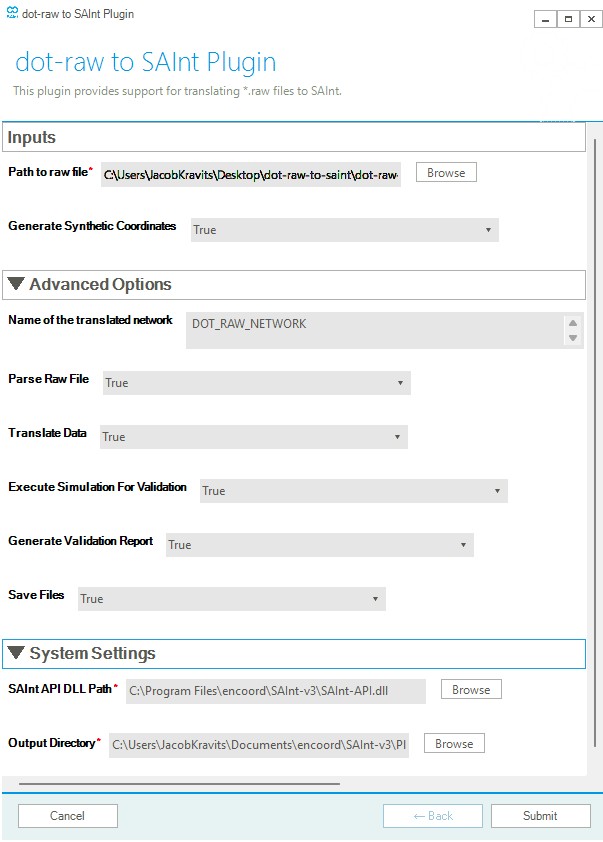
Screenshot:
-
Multi-Component Translation: Supports translation of major power system components:
- ZONE
- BUS
- GENERATOR
- LOAD
- TRANSFORMER
- BRANCH
- SWITCHING DEVICE
- FIXED AND SWITCHED SHUNT DEVICES
-
Version Compatibility: Supports DOT-RAW file versions 33, 34 and 35.
-
Validation & Reporting: Automatically generates comparison plots to validate translation accuracy.
-
Synthetic Coordinates: Optionally generates synthetic BUS coordinates for visualization in SAInt GUI.
Inputs
-
Path to RAW File
Full path to the*.rawfile. -
Generate Synthetic Coordinates
Option to generate synthetic BUS coordinates for visualization in SAInt. -
Output Directory
Full path to the directory where the translated SAInt network, scenario, and condition files will be saved.
If the network converges, validation plots will also be saved here.
Advanced Inputs (Optional)
-
Name of the translated network
Name for the translated SAInt network. Default is"DOT_RAW_NETWORK". -
Parse RAW File
Set toTrueto parse the.rawdata into readable CSV files. -
Translate Data
Set toTrueto convert parsed data into SAInt-compatible Excel import files. -
Run Simulation for Validation
Set toTrueto generate native SAInt network and scenario files and run a SteadyACPF simulation. -
Generate Validation Report
Set toTrueto generate HTML comparison plots. -
Save Output Files
Set toTrueto save all generated files.
Example with IEEE 118 Bus System
The following is an example of running the plugin with the IEEE 118 Bus System.
What You Will Need
To start, please download:
- The latest version of SAInt.
- The IEEE 118-Bus System
.rawdataset, downloadable from: here - This DOT-RAW to SAInt plugin. Unzip it and note the location of the download.
dot-raw-to-saint-plugin/
├── main.exe
├── form.yaml
└── (other files)
Running the PlugIn
- Open SAInt GUI
- Go To Tools → Plugin → Select (select the folder containing the plugin)
- Execute via Tools → Plugin → Execute
Fill out the form:
- Path to RAW File: ./path to your .raw file
- Generate Synthetic Coordinates: True
- Destination of Translated Files: ./path to your output directory
- Name of the translated network (Advanced Input): IEEE_118
Understanding the Output
In the specified output directory, the following files and folders will be created:
output_folder/
├── IEEE_118.enet                    # SAInt network file
├── acpf.esce                        # Scenario file
├── acpf.econ                        # Scenario condition file
├── network.xlsx                     # SAInt-compatible network import file
├── info.log                         # Translation operation logs
├── output_folder.html               # Combined validation report (interactive)
├── parsed/                          # Parsed .raw data
│   ├── BUS.csv
│   ├── BRANCH.csv
│   ├── GENERATOR.csv
│   ├── LOAD.csv
│   └── ...
├── plots/                           # Individual validation plots
│   ├── voltage_comparison_plot.html
│   ├── branch_power_flow_comparison_plot.html
│   ├── generator_power_comparison_plot.html
│   ├── load_power_comparison_plot.html
│   ├── shunt_power_comparison_plot.html
│   ├── voltage_difference_violin_plot.html
│   ├── branch_power_flow_difference_violin_plot.html
│   ├── generator_power_difference_violin_plot.html
│   ├── load_power_difference_violin_plot.html
│   └── shunt_power_difference_violin_plot.html
└── validation_data/                 # Validation comparison data
    └── voltage_comparison.csv
File Descriptions
| File/Folder | Description |
|---|---|
{network_name}.enet |
SAInt native network file |
acpf.esce |
SAInt scenario file for AC power flow simulation |
acpf.econ |
SAInt scenario condition file (created only if simulation succeeds) |
network.xlsx |
SAInt-compatible Excel network import file |
info.log |
Log file recording translation operations |
{output_folder}.html |
Combined interactive HTML validation report with all plots |
parsed/ |
Folder containing .csv representations of parsed .raw sections |
plots/ |
Folder containing individual interactive HTML validation plots |
validation_data/ |
Folder containing comparison data exported as CSV files |
Changelog
v0.4.12
- HVDC Support: Added support for VSC DC and Two Terminal DC devices with updated implementation to use two prosumers
- Switched Shunts: Full support for switched shunt devices translation
- Enhanced Information Fields:
- Info3 column now contains dot-raw object type for unique identification
- Info property populated with relevant information from dot-raw
- Identifying information moved to Info3 field
- Negative Generator Translation: Generators with negative “PB” values are now correctly translated into SAInt EPS
- Line Shunt Translation: Line G/B ij values are now translated to additional shunt devices
- Dummy Transformers: Added support for dummy transformers to accommodate unequal BaseVs from .raw files
- Intertie Groups: SAInt EGRPs are now created for interties between .raw Areas
- Transformer Improvements:
- Translation logic updated to use star configuration for 3-winding transformers
- TRANSFORMER ANG properties translated to SAInt TRF PHISETDEF
- Validation & Reporting:
- Single page interactive HTML validation report
- Standardized pipeline structure with notifications for zero impedance lines during validation
- Dot-raw results integrated into SAInt constants
- Remote Voltage Control: Support for remote node voltage control for generators
- Default Naming: Updated default naming convention
- Zone Reference Nodes: ReferenceNodeName for zone objects now contains reference node name
- Duplicate Zones: Fixed duplicate zones being generated for each Area
- Duplicate Columns: Fixed duplicate inservice columns for lines
- Duplicate Shunt Devices: Resolved issue with duplicate shunt devices
- Transformer Ratings: Dummy transformers now capture correct ratings
- EPS Power Limits: Fixed negative PGMAXDEF for EPS (now correctly set as PDMINDEF)
- Intertie Groups: Transformers are now correctly captured in intertie groups
- Three-Winding Transformers:
- Fixed star-node RatedV issues
- Updated equivalencing logic
- Fixed GGDEF/BBDEF values (now properly set for all windings, not just winding 1)
- Impedance Translation:
- Fixed transformer impedance translation when CZ = 3
- Updated CZ = 2 implementation
- Use bus BaseV when nominal voltage is 0 for converting TRF impedances
- Control Logic:
- Fixed RemoteName field handling when COD{1,2,3} = 0 (No Control)
- Updated CM = 1 and CM = 2 implementations
- Power Flow Settings:
- Updated PFSETDEF implementation
- Fixed EPS PDMAXDEF values being set to negative
- Bus Handling: Fixed Bus IDE = 4 being ignored
- Polarity Issues:
- Fixed polarity handling for branch shunt conductance (G)
- Fixed polarity handling for GENERATOR (PB) value
- Validation Plots: Removed out of service branches from branch comparison plots
- Q Comparison: Fixed Q comparison for SHT (shunt devices)
- Parsing: Fixed incorrect parsing when properties contain commas and slashes within values
- SAInt Compatibility: Removed “Press any key to continue” prompt (no longer supported by SAInt)
v0.3.0
- System data parsing: Properties like version, network frequency are now automatically parsed.
- Version 34 support: Files with version 34 can now be translated!
- Group Translation Logic: SAInt
EGRPobjects are now created from rawzoneobjects! - Bug Fixes: Various bug fixes like fixing translation failures for switched shunt objects.
v0.1.0
- Robust Translation: Translate from dot-raw files to SAInt files.
- Automated Validation: Perform basic validation to ensure accurate translation.