Overview
The contingency-analyzer plugin runs a set of electric-network contingencies against a SAInt scenario and records the outcomes of user-defined queries for each contingency. It opens the network (.enet), scenario (.esce), and, by default, a warm-start electric-condition (.econ), applies out-of-service events for each contingency, re-solves the scenario, evaluates IronPython queries against the model, and writes structured results plus an HTML report. The scenario must be a solved SteadyACPF case; other scenario types are not supported for this workflow.
Versions Compatible with SAInt 3.9
- v0.7.6 (1.5 MB)
Versions Compatible with SAInt 3.8
- v0.6.6
Versions Compatible with SAInt 3.7
- v0.5.2
- v0.1.0
Screenshot:
Inputs
The plugin opens a single dialog. At the top, under General, you choose the network, scenario, and both CSV specifications. Below that, Advanced is collapsed by default; expand it to set worker count, warm-start behavior, alternate rating preprocessing, output locations, logging, timing collection, and output file names. The order below matches what you see on screen.
General
SAInt network file (.enet) — Required. Your electric network file (topology and components). The path is often filled in for you when you launch the plugin from SAInt.
SAInt scenario file (.esce) — Required. Must be a solved SteadyACPF scenario: solve the base case before you run the plugin. For each contingency, the tool takes elements out of service and re-solves on that steady-state ACPF formulation.
Contingency element specifications (CSV) — Required. CSV that lists each contingency and which objects are out of service. The suggested path is usually next to your network (for example contingency_element_specs.csv in the same folder as the .enet). See Contingency element specifications.
Contingency query specifications (CSV) — Required. CSV where each row names a query and gives an IronPython expression for SAInt to evaluate after each contingency solve. The suggested path is usually beside your network (for example contingency_query_specs.csv). See Contingency query specifications.
Advanced
Parallel workers (0 = serial) — Controls parallelism. 0 runs contingencies one after another (one worker area, one load of the DLL). Higher values (up to 2000 in the UI) split contingencies across parallel workers; each worker uses its own copy of the model under a contingency-execution subfolder inside your output directory. You cannot change that subfolder’s name from this dialog.
Warm start electric condition (.econ, optional) — Optional. A solved electric-condition file used to initialize every contingency run when warm start is enabled. If you leave this blank while warm start is enabled, put a file named {scenario_stem}.econ next to your .esce (for example MyCase.esce and MyCase.econ in the same folder). If no suitable .econ is found, the run stops with an error. When the warm-start file has the same stem as the scenario, the plugin copies it into the output folder as {stem}_WARM_START.econ so it does not overwrite or clash with the scenario; otherwise it keeps the original file name in the output folder. This field is ignored when warm start is disabled.
Enable warm start — Optional. Default is Yes. When enabled, each worker opens the warm-start .econ file and sets the scenario warm-start parameters to use the electric condition for all inputs. When disabled, no .econ file is required or opened, and each worker sets the scenario warm-start parameter to No.
Alternate rating property — Optional. Default is No Override. Choose Constant2 or Constant3 to override SMAXDEF with positive values from that EBR property during preprocessing before contingencies are executed.
Output directory — Required. Folder where the plugin writes copies of the .enet, .esce, optional warm-start .econ, both CSVs, results.json, the HTML report, and (when using workers) the contingency-execution tree. Default is {SAIntDocPath}//PluginOutput.
SAInt API DLL path — Location of SAInt-API.dll. Default is {SAIntInstallPath}//SAInt-API.dll.
Logging level — How much detail appears in the log: Debug, Info, Warn, or Error. Default is Info.
Collect operation timing (Performance tab and JSON) — Optional. When set to Yes, each run records wall-clock timing (milliseconds) for opening the network, scenario, optional electric-condition file, and scenario settings per worker, and for each contingency: add events, run simulation, run value queries, run conditional queries, and remove events. Those values appear in results.json and in the HTML report’s Performance tab (last tab). Default is No; leave it off unless you need timings, since it adds a small amount of measurement overhead.
Results filename (without .json extension) — Base name for the JSON results file (no .json suffix in this field). Default is results → results.json in the output directory.
Report filename (without .html extension, optional) — Base name for the HTML report (no .html suffix here). If you leave it blank, the report is named after the output folder (for example folder MyRun → MyRun.html).
Contingency element specifications
The element-spec CSV has a header row and one row per out-of-service element. Rows that share the same contingency_name belong to one contingency. The plugin validates:
element_idmust either be blank for a no-element contingency row, or look likeTYPE.NAME: a non-empty object type, a dot, and a non-empty name (for exampleLI.ALBANY_NY_TO_GREENFIELD_MA,FGEN.BRIDGEPORT).EGRP.NAMEmay be used as a group selector. During preprocessing, the tool opens the network, validates the group exists, and expands it by queryingEGRP.NAME.!EXT.%.IDandEGRP.NAME.!EBR.%.ID.element_rankis optional and defaults to0when the column or value is omitted. Nonzero ranks are reserved for sequential contingencies and are currently reported as unsupported per-contingency errors.
Columns
| Column | Description |
|---|---|
contingency_name |
Logical name for the contingency; repeated across rows to group multiple elements. |
element_id |
SAInt object id in the form TYPE.NAME, EGRP.NAME group selector, or blank for a no-element contingency. |
element_rank |
Optional non-negative integer rank. Elements with the same rank are intended to be evaluated together; only rank 0 is executed today. |
For each element, the worker adds an electric event that sets the object’s InService property to 0 for the duration of that contingency run, then removes the event before the next contingency.
Group selectors generate executable contingencies before worker assignment. A single group creates one contingency per returned member; multiple groups create one contingency for every member combination; fixed elements are included in every generated contingency. Generated combinations that would turn off the same object twice are skipped with a preprocessing warning. Missing direct objects or missing groups are reported in preprocessing_messages and do not produce executable contingencies for that source spec.
Example (contingency_element_specs.csv)
The following is the IEEE 39-bus (ENET39) fixture used in tests; it illustrates single-line and single-generator outages, one rank-zero multi-element contingency, one unsupported sequential contingency, and a missing-element row that produces a resolution error:
contingency_name,element_id,element_rank
BASE_CASE,,0
LINE_0,LI.ALBANY_NY_TO_GREENFIELD_MA,0
LINE_1,LI.ALBANY_NY_TO_KINGSTON_NY,0
LINE_2,LI.DANBURY_CT_TO_KINGSTON_NY,0
GENERATOR_0,FGEN.BRIDGEPORT,0
GENERATOR_1,FGEN.DIGHTON,0
GENERATOR_AND_LINE,FGEN.BRIDGEPORT,0
GENERATOR_AND_LINE,LI.DANBURY_CT_TO_KINGSTON_NY,0
EACH_NUCLEAR_GENERATOR,EGRP.NUCLEAR,0
EACH_NUCLEAR_GENERATOR_AND_LINE,EGRP.NUCLEAR,0
EACH_NUCLEAR_GENERATOR_AND_LINE,LI.ALBANY_NY_TO_GREENFIELD_MA,0
NUCLEAR_GENERATORS_AND_COAL,EGRP.NUCLEAR,0
NUCLEAR_GENERATORS_AND_COAL,EGRP.COAL,0
UNSUPORTED_SEQUENTIAL,FGEN.BRIDGEPORT,0
UNSUPORTED_SEQUENTIAL,LI.DANBURY_CT_TO_KINGSTON_NY,1
MISSING_ELEMENT,LI.FOO,0
Contingency query specifications
The query-spec CSV has a header row and one row per query. Each query_command is an IronPython query string: SAInt evaluates it in its IronPython host against the post-contingency model (the same mechanism as interactive IronPython queries in SAInt). The helpers, object references, and wildcards you can use are whatever your SAInt version exposes to IronPython (for example emin, emax, eminat, emaxat, find, and patterns such as ENO.%.VPU, LI.%.LLS).
Columns
| Column | Description |
|---|---|
query_name |
Human-readable label stored in results and shown in the report. |
query_command |
IronPython query evaluated on the post-contingency model state. |
Result shaping: The plugin separates value queries from conditional find(...) queries. Value queries produce one result object with a single value: numeric-looking scalars are JSON numbers, text/object-id scalars are strings, bracketed list returns are preserved as raw strings, and empty returns are null. Conditional find(...) queries such as find('LI.%.LLS>95.0')[0] produce one result object with matches, where each match stores object_id and the fetched property_value for the query property (LLS here). If users omit [0] on a conditional query, the executable query object adds it automatically while the copied CSV remains unchanged. Evaluation failures are stored in an error field.
Example (contingency_query_specs.csv)
ENET39 fixture queries for voltages, line loading, and overloaded lines:
query_name,query_command
Min Network Voltage Bus,"eminat('ENO.%.VPU')"
Min Network Voltage (pu),"emin('ENO.%.VPU')"
Max Network Voltage Bus,"emaxat('ENO.%.VPU')"
Max Network Voltage (pu),"emax('ENO.%.VPU')"
"Max Line Loading (pu, line base)","emax('LI.%.LLS')"
Max Line Loading ID,"emaxat('LI.%.LLS')"
"Line Loading Above 95% (pu, line base)","find('LI.%.LLS>95.0')"
"Line Loading Above 85% (pu, line base)","find('LI.%.LLS>85.0')[0]"
Computation logic
- Resolve warm start: When warm start is enabled, determine the source
.econfrom the explicit path or from{scenario_stem}.econnext to the scenario. When disabled, skip.econresolution. - Copy inputs: Copy
.enet,.esce, both CSVs, and, when enabled, the warm-start.econinto the output directory (with the warm-start rename rule when stems match). - Parse CSVs: Build ordered unresolved contingency specs from element rows and attach UUIDs; build separate value and conditional query lists with UUIDs. Conditional query commands are normalized to include
[0]and record their compared property. - Preprocess contingencies and network: Run a preprocessing process that opens the copied network, validates element ids, expands
EGRPselectors, applies alternate ratings when configured, and writes concrete executable contingencies plus preprocessing messages. - Execute: Under
contingency-execution, create worker folder(s), writeworker_input.json, apply scenario warm-start settings once per worker, and run each assigned rank-zero contingency: add events →run_esim_no_sol→ evaluate value queries → evaluate conditional queries → remove events. If a contingency contains any nonzeroelement_rank, the worker skips it and records an unsupported sequential contingency error. If timing collection is enabled, the worker also records durations for the open-file calls, scenario settings, and each contingency phase listed above. - Aggregate: Merge worker outputs into one result structure, classify each contingency’s
violation_type, compute aggregatesummarycounts, write JSON, and render the HTML report with the same embedded JSON for tables and summaries.
If adding an event fails for a contingency, that contingency still appears in the results with solver status unset and no query rows (queries are skipped for that case).
Output
Results JSON (<results_filename>.json)
Contains:
summary: Aggregate counts for the generated result set:total_contingencies,base_contingencies,single_contingencies,multiple_contingencies,sequential_contingencies,total_queries,no_violation_contingencies,violations_contingencies, andsimulation_error_contingencies.contingency_specs: Parsed contingency specifications from the input CSV, with names, raw element IDs/ranks, and UUIDs.contingencies: Preprocessed contingency definitions used for execution, with names, UUIDs, generatedtype(base,single,multiple, orsequential),element_count, optionalinfo, optionalsource_spec_uuid, and element lists (object_type,object_name,element_rank, per-element UUID).value_queries: Names, executable IronPython query strings (query_command), and UUIDs for non-conditional queries.conditional_queries: Names, executablefind(...)query strings (query_command), UUIDs, and extractedpropertyvalues for conditional queries. Commands are serialized with[0]even when the CSV omitted it.preprocessing_messages: Warnings or errors produced while validating element ids and expandingEGRPselectors.execution_results: For each contingency UUID,violation_type(no_violation,violations, orsimulation_error),solver_results,value_query_results({ contingency_uuid, query_uuid, value, error }), andconditional_query_results({ contingency_uuid, query_uuid, match_count, matches, error }). Conditional matches are{ object_id, property_value }with numericproperty_value, andmatch_countis always serialized, including0for no matches. When timing collection is enabled, each row also includestimingwithadd_events_ms,run_simulation_ms,run_value_queries_ms,run_conditional_queries_ms, andremove_events_ms.worker_timings(optional): Present only when timing collection is enabled. Array of one object per worker process, each withworker_id,open_network_ms,open_scenario_ms,open_econ_ms, andscenario_settings_ms.open_econ_msis blank/null when warm start is disabled.
This file is suitable for downstream scripting or archiving.
HTML report
An interactive report that embeds the full results JSON and presents contingency and query tables. Tabs are Summary (default), Conditional Query Results, Solver Results, Inputs, and (when timing data is present) Performance last.
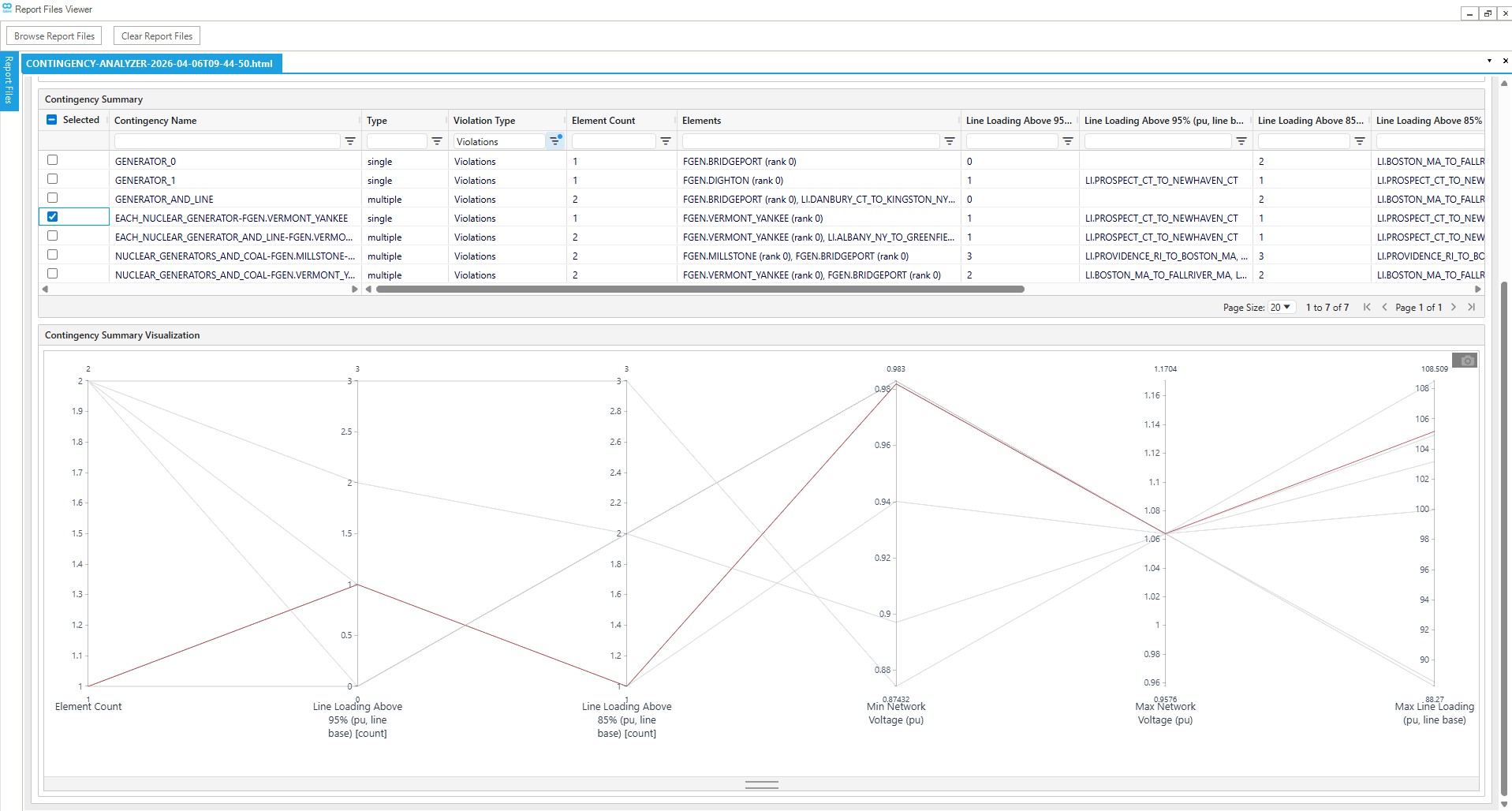
- Summary: Input paths, Statistics counts (contingency and query totals plus violation breakdown), output folder path, and a Contingency summary table with contingency type, violation type, element count, elements, and one column per value or conditional query.
- Conditional Query Results: One row per conditional-query match (
object_id,property_value). - Solver Results: Contingency name plus solver status and error fields.
- Inputs: Contingency Specifications, Value Queries, Conditional Queries, and Preprocessed Contingencies tables.
- Performance: Worker timing and Contingency timing tables built from the embedded JSON.
Open the report in a browser from the output directory.
Interpreting results
- Violation type: Each
execution_resultsrow includesviolation_type.simulation_errormeans the solver failed or did not return status code"32".violationsmeans the solve succeeded and at least one conditional query returned matches (match_count > 0).no_violationmeans the solve succeeded and no conditional query matched. Aggregate counts appear insummaryand the report Statistics section. - Solver status: Check
solver_results.status_codeper contingency when diagnosing non-convergent or failed solves. - Query errors: Result objects with an
errorvalue indicate the IronPython query could not be evaluated or a conditional property lookup failed; verify syntax and object ids against your network and SAInt’s IronPython API. Query errors are stored in JSON but are not shown in the report’s Contingency summary query columns (those cells are left blank). - Multiple values: Value-query list returns stay as raw bracketed strings. Conditional query matches are serialized as object/property pairs in
matches. - Empty results: Value-query
value: nullor conditionalmatch_count: 0can mean SAInt returned nothing meaningful for that evaluation. - Timing fields (when enabled): Millisecond durations are wall-clock time in the worker process; use them comparatively across contingencies or runs, not as absolute performance guarantees.
Changelog
v0.7.6
- Warm start support: Added electric-condition (
.econ) warm start capability, including explicit or inferred warm-start paths, an enable/disable option, and per-worker scenario warm-start setup. - Alternate rating support: Added optional preprocessing that can override
SMAXDEFwith positive EBRConstant2orConstant3values before running contingencies. - Group-based contingency expansion: Added support for
EGRP.NAMEselectors so users can loop over group members and group combinations from the contingency CSV instead of manually listing every generated case. - Richer query results: Conditional
find(...)queries now return the matching object IDs and corresponding numeric property values, while value-query results are included directly in the summary output. - Improved reporting and filtering: Reworked the report around a wide contingency summary table with one column per query, advanced table filtering, CSV exports, and visual exploration of numeric summary columns.
- Performance diagnostics: Added optional timing collection in both
results.jsonand the report’s Performance tab for worker setup and per-contingency execution phases. - Parallel execution stability: Improved highly parallel runs by increasing the Windows worker stack reserve, preserving SAInt execution settings, cleaning up API objects more reliably, and keeping serial and parallel result ordering consistent.
v0.6.6
- HTML report viewer: Replaced the older report output with an interactive HTML viewer for reviewing contingency, solver, and query results.
- Advanced table filtering: Added a more capable table experience for exploring large result sets.
- Form prepopulation: Used GUI-provided parameters to prepopulate common plugin inputs where available.
- Parallel correctness fixes: Fixed issues where parallel runs could use different solver settings than the initial scenario, return results in a different order from serial runs, or leave temporary contingency scenarios behind.
- Release compatibility updates: Updated migration, dependency, default DLL path, and release process details for the SAInt 3.8 plugin line.
v0.5.2
- Parallelization support: Allowed contingency analyses to run in parallel.
- Solver configuration preservation: Parallel contingency scenarios copy the base scenario’s linear solver engine so parallel execution better matches the solved initial scenario.
v0.1.0
- Basic N-1 contingency: Added basic N-1 contingency analysis.