Overview
Translation Validator is a SAInt plugin for checking a translated electric network and scenario against reference results produced by a translation plugin. Select the SAInt network, solved scenario, and reference file in the form; the plugin compares the requested SAInt objects and properties, then creates validation results and an interactive report in the output directory.
Versions Compatible with SAInt 3.9
- v0.1.6 (1.3 MB)
- v0.1.5
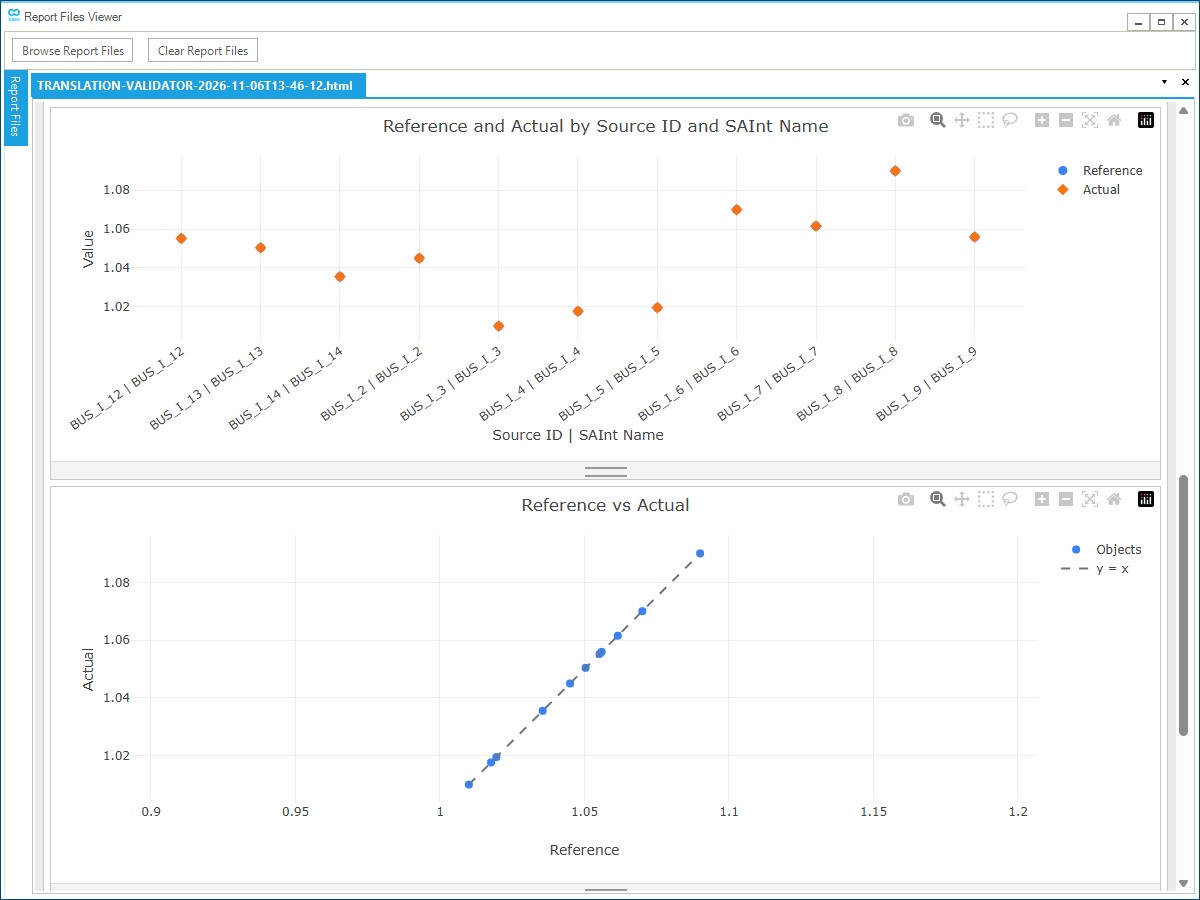
Screenshot:
When To Use This Plugin
Use Translation Validator after running a translation workflow when you want to confirm that the translated SAInt model still matches the reference results from the source tool. The scenario must already be solved before validation.
Form Inputs
General
SAInt Network File (.enet) - Select the electric network file to validate. The form defaults to the active SAInt network path when available.
SAInt Scenario File (.esce) - Select the solved scenario file to validate. The form defaults to the active SAInt scenario path when available. Files next to the scenario with the same base name are copied with it, so companion scenario files stay together.
Reference File (translation plugin output) - Select the reference output created by the translation plugin. The form defaults to the expected reference file in the network directory when available.
Advanced
SAInt API DLL Path - Path to SAInt-API.dll. The default uses the SAInt install path.
Output Directory - Folder where the plugin writes copied inputs, validation results, the HTML report, and logs. The default is PluginOutput under the SAInt documents path.
Logging Level - Controls how much detail is written to the plugin log.
- Debug: Most detailed logging
- Info: Standard logging
- Warning: Warnings and errors only
- Error: Errors only
Results Filename - Name for the validation results file, without the file extension. Defaults to results.
Report Filename - Optional name for the HTML report, without the file extension. If left blank, the report uses the output directory name.
What The Plugin Checks
- Copies the selected files - The network, scenario companion files, and reference file are copied into the output directory before validation.
- Loads the SAInt project - The plugin verifies the configured SAInt API file, then opens the copied network and scenario.
- Checks project readiness - The plugin confirms that a network and scenario are open, that the scenario type is supported, and that the scenario solver status is
Solved. If the SAInt API version does not start with3.9, the plugin logs a warning but continues. - Compares requested objects and properties - For each object requested by the reference file, the plugin finds the matching SAInt object and compares the requested properties.
- Identifies missing items - The report separates objects that are missing entirely from objects that exist but are missing one or more requested properties.
- Identifies extra SAInt objects - For each referenced SAInt object type, the plugin lists SAInt objects that are present in the model but absent from the reference.
- Calculates numeric differences - When both compared values are numeric, the report shows the difference as actual SAInt value minus reference value.
Outputs
The output directory contains:
- The copied input files used for validation
- A validation results file using the configured Results Filename
- An HTML report using the configured Report Filename, or the output directory name when no report filename is provided
- A plugin log file
HTML Report
The report includes:
- Input paths, output folder, scenario type, plugin version, and generation time
- Summary counts for reference objects, matched objects, missing objects or properties, and extra SAInt objects
- Tables for missing reference items and extra SAInt items
- One comparison tab for each SAInt object type and property
- Charts for numeric comparisons, including reference versus actual values and difference distributions
- CSV export from report tables
Changelog
v0.1.6
- Null reference values: Added support for
nullproperty values in reference files, while still fetching SAInt actual values for comparison and showing available SAInt values in the report.
v0.1.5
- Initial validation workflow: Created the workflow for selecting a SAInt network, solved scenario, and translation reference file, then generating validation results, logs, and an HTML report.
- Expanded SAInt object support: Added validation support for all SAInt object types requested by the reference file, including object matching, property comparisons, missing reference items, and extra SAInt objects.
- Interactive report: Added summary counts, missing and extra object tables, object/property comparison tabs, numeric charts, and CSV exports.
- Improved chart readability: Adjusted the Reference vs Actual visualization so large X-axis labels have more room and remain easier to read.
- Object count accuracy: Corrected misleading object counts so report summaries better reflect reference objects, matched objects, missing items, and extra SAInt objects.