Node Locator
Overview
Node Locator is a SAInt Python plugin that calculates and updates electric-network node coordinates.
Node Locator supports two coordinate workflows:
- CSV-provided workflow — a CSV supplies the fixed node coordinates used by Spring.
- SAInt-network workflow — when no CSV is supplied, existing nonzero ENET coordinates are fixed and nodes at
(0, 0)are calculated.
The plugin currently supports:
- Spring layout
- Circular layout
- Optional CSV-defined fixed locations
- Existing SAInt coordinate anchors
Versions compatible with SAInt 3.9
- v0.1.1 (193 MB)
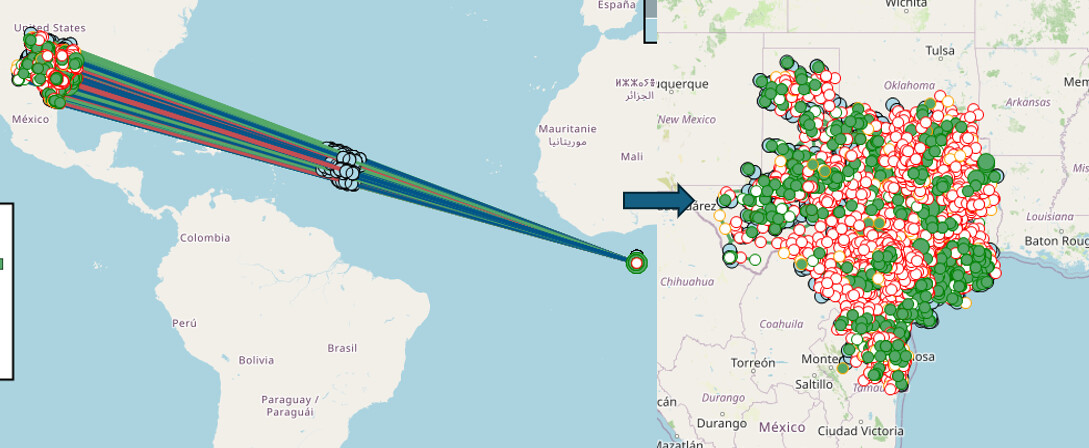
Inputs
SAInt Network File
Required
File type: .enet
The electric network file whose node coordinates will be processed.
Coordinate CSV File
Optional
File type: .csv
Required columns: Name, X, Y
Example:
Name,X,Y
N1,-104.9903,39.7392
N2,-105.2705,40.0150
| Column | Description |
|---|---|
Name |
SAInt node name. It must match a node in the ENET. |
X |
Fixed X coordinate. |
Y |
Fixed Y coordinate. |
CSV rules:
- Valid rows become candidate fixed locations.
- Node names are validated against the ENET.
- Invalid rows are excluded and reported.
- In CSV mode, existing SAInt coordinates are not automatically added as anchors.
- CSV coordinates are written into the copied ENET.
Layout Input Options
Spring Layout
Spring is a force-directed NetworkX layout. Connected nodes attract one another, nodes repel one another, and the algorithm iteratively moves calculated nodes toward a stable arrangement.
Behavior:
- Fixed locations remain anchored.
- Nodes without fixed coordinates are positioned relative to the network topology and fixed anchors.
- Final calculated coordinates are written to the copied ENET.
Settings:
- Seed — controls the pseudo-random starting state and improves repeatability.
- Iterations — controls how many force-directed iterations are performed.
- K factor — controls preferred node spacing.
- Coordinate padding — adds room around fixed-coordinate bounds.
Circular Layout
Circular places every node around a circle.
Behavior:
- Every node is recalculated.
- CSV anchors are ignored.
- Existing SAInt coordinates are ignored.
- All final coordinates are written to the copied ENET.
Settings:
- Circular scale — controls the radius or overall size of the layout.
Advanced Inputs (Optional)
-
SAInt API DLL Path
Full path to the SAInt API DLL. Defaults to{SAIntInstallPath}``//SAInt-API.dll. -
Output Directory
Full path to the directory where the copied and updated SAInt network, JSON results, copied coordinate CSV, and HTML report will be saved. Defaults to{SAIntDocPath}//PluginOutput. -
Set Network CRS to None
Optional setting that changes the copied ENET network CRS type toNONE. -
Logging Level
Controls the amount of diagnostic information produced by the plugin. -
Results Filename
Base name for the JSON output without.jsonextension. Defaults toresults. -
Report Filename
Base name for the HTML output without.htmlextension. If left blank, the report name is derived from the output-folder name.
Installation
What You Need
- The latest version of SAInt installed.
- The packaged Node Locator plugin.
A packaged plugin will typically contain:
node-locator.plugin/
├── main.exe
├── form.yaml
├── icon.svg
└── _internal/
Installing or Selecting the Plugin in SAInt
- Open the SAInt GUI.
- Go to Tools → Plugin Settings → Install Plugin.
- Select the folder containing the Node Locator plugin.
- Select Apply & Exit.
Running the Plugin
- Open the SAInt GUI.
- Go to Tools and select the installed Node Locator plugin.
- Complete the plugin form:
- Select the required SAInt network file (
.enet). - Optionally select a coordinate CSV file.
- Choose the layout type:
springorcircular. - Configure the settings for the selected layout.
- Select the output directory.
- Select the required SAInt network file (
- Execute the plugin.
Understanding the Output
Typical output:
ENET39_Spring/
├── ENET39_spring_csv.enet
├── fixed_locations.csv             # Only when a CSV was supplied
├── results.json
└── ENET39_Spring.html
| File | Description |
|---|---|
Updated copied .enet |
Copied network containing final coordinates. |
Copied .csv |
Coordinate source used for the run, present only in CSV mode. |
results.json |
Structured inputs, settings, statuses, coordinates, and SAInt write outcomes. |
{output-folder-name}.html |
Human-readable report with tables and embedded Sigma graph. |
Results
The JSON includes:
- Plugin name and version
- Copied input paths
- Selected layout and settings
- Fixed-location parse statuses
- Fixed-location validation statuses
- Fixed locations
- Layout coordinates
- Node update statuses
- SAInt write results
- Final updated nodes
In no-CSV mode:
"fixed_location_parse_statuses": []
In CSV mode, this list may contain parsing warnings or errors.
HTML Report
The report includes:
- Run and input summary
- Layout settings
- Fixed-location information
- Validation and status tables
- Node update results
- Embedded Sigma graph
Coordinate Workflows
Workflow 1: CSV-Provided Coordinates
When a CSV is supplied:
- The CSV is the only source of fixed locations.
- Valid CSV nodes become fixed Spring anchors.
- Existing SAInt coordinates do not create additional anchors.
- Nodes not listed in the CSV are calculated.
- CSV-fixed coordinates are written into the copied ENET.
- Invalid CSV rows and unmatched node names are reported.
Example:
| Node | Existing ENET coordinate | Listed in CSV | Result |
|---|---|---|---|
A |
(100, 200) |
No | Calculated |
B |
(0, 0) |
Yes | Fixed from CSV |
C |
(300, 400) |
Yes | Fixed from CSV |
D |
(0, 0) |
No | Calculated |
Use this workflow when a trusted external coordinate source should be authoritative.
Workflow 2: Existing SAInt Network Coordinates
When no CSV is supplied:
- Existing ENET coordinates are inspected.
- Nodes with coordinates other than
(0, 0)become fixed Spring anchors. - Nodes at exactly
(0, 0)are treated as unknown. - Existing fixed coordinates remain unchanged.
- Calculated coordinates are written into the copied ENET.
Example:
| Node | Existing ENET coordinate | Result |
|---|---|---|
A |
(100, 200) |
Fixed |
B |
(0, 0) |
Calculated |
C |
(-70, 42) |
Fixed |
D |
(0, 0) |
Calculated |
Changelog
v0.1.1
- Initial Node Locator implementation.
- Added CSV-provided and SAInt-network coordinate workflows.
- Added Spring and Circular layouts.
- Added coordinate write reconciliation.
- Added copied ENET output.
- Added JSON and HTML reports.
- Added embedded Sigma graph.
- Added unit, snapshot, and live integration tests.