Modeling Events - Scenario Time Parameters

Hi,

I’m wondering whether I can specify that an event (specifically an outage) is unplanned (as opposed to planned) - and, if so, if I need to adjust the Time parameters for my scenario? I’ve constructed my outages using the steps given here. My current set-up is a 24 hour horizon (1 hour time step) with a 48 hour look-ahead (also 1 hour time step). I’d like to give 4 hours of heads-up on unplanned outages. Is there a way to do this?

Thanks!

Hi @emmacooper

Thank you for your question! For clarity, allow me to restate your problem so I’m sure I’m not misunderstanding you.

You would like to model the impact of an unplanned outage in a power system. However, you are using a Time Horizon of 24 hours and a Look Ahead of 48 hours. The 48-hour Look Ahead period is far too long to model a realistic “unplanned” outage. If the optimization engine can see that coming from 2 days away, there will be time to plan accordingly for the outage.

You are also correct to point out that even up to 24 hours of notice for an unplanned outage is too long to be realistic. So what is the solution here? Is SAInt capable of this?

Yes! But there is some nuance here. The problem you are describing is one reason why system operators distinguish between a day-ahead and real-time market. In addition to unforeseen outages, there can be forecasting errors and a system operator will use a different scenario in each case. At a high level, the day-ahead model typically schedules unit commitment of generators and the real-time model will make the finer adjustments needed for the operation to meet real-time need, accounting for any differences between the forecast and real-time conditions.

Because of this extra effort involved, most resource planning models avoid this level of detail and rely on the planning reserve margin to ensure approximately enough resources are always available (usually erring on the side of more than enough to be safe). If you are using SAInt for high-level resource planning, I would advise following this approach. If you are using SAInt to model detailed operation of a power system under stressed conditions, you would need to use multiple scenarios to achieve this. I will explain below using an example on the PCM_PEAK_DEMAND_WEEK scenario of the ENET39 dataset.

Step 1: Execute a day-ahead scenario. This typically has a 24-hour horizon with a look-ahead period and will not include any unplanned circumstances.

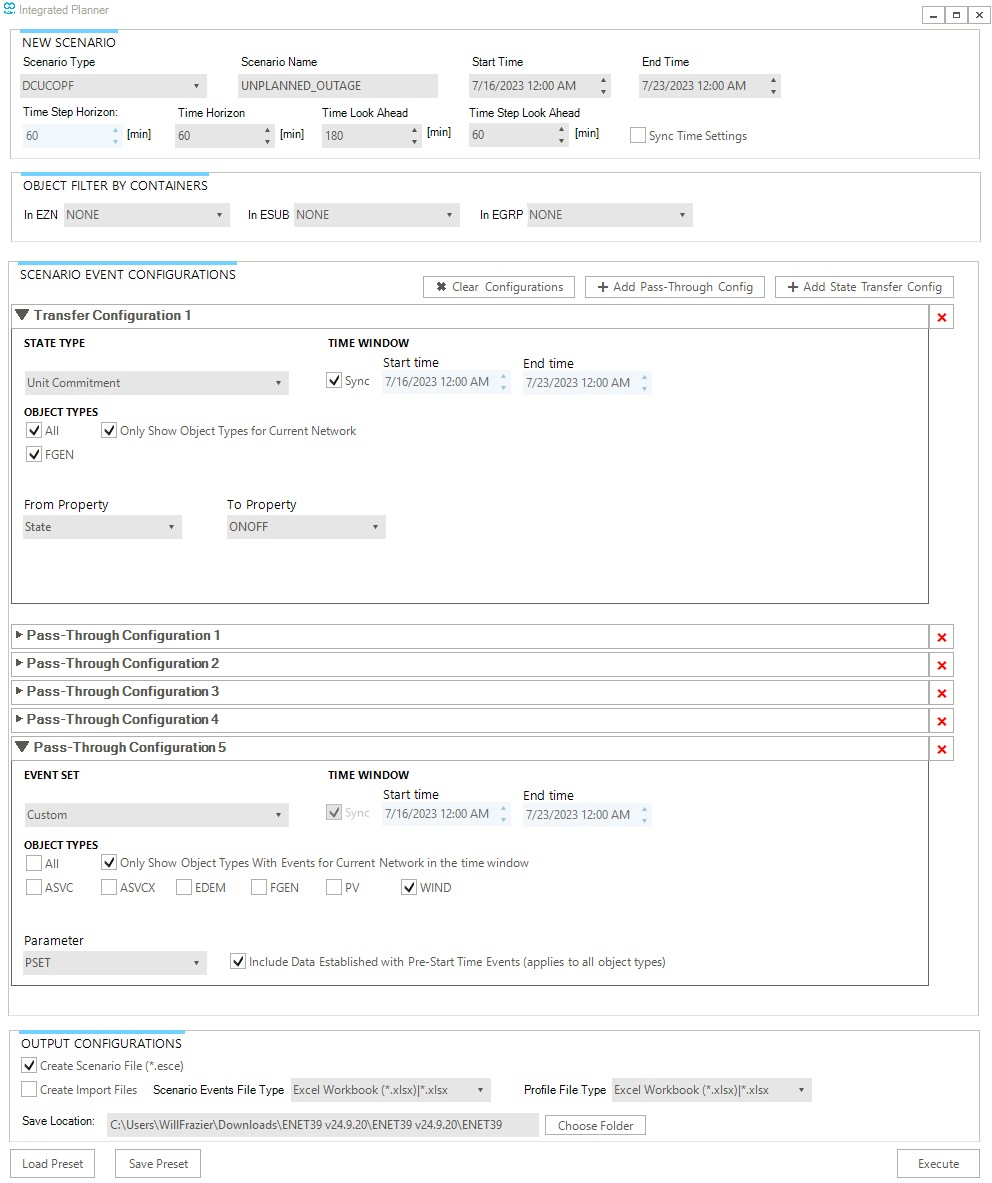
Step 2: Use the “Integrated Planner” (new in SAInt V3.8!) to send the unit commitment results to another scenario. See the screenshot below for reference and please ask for clarifying questions if you need. Pay close attention to the details in the example screenshot.

Step 3: Open this new scenario, add your unplanned outage event, and execute!

Step 4: You may need to make some modifications to generator unit commitment or other constraints to ensure this new scenario is realistically representing the behavior of system operation.

Hi @will,

Thanks for these instructions. It seems like it would be easy to run into infeasibilities related to generator up and down times using this approach, as the scenario will have two separate sets of generator ON/OFF/ONOFF events, where the first set is imported from the original DA problem, and the second set is loaded in using this approach. While both sets of events may feasible when implemented in isolation, they may violate MinUpTime and MinDownTime constraints when combined. This might be exacerbated by the fact that the binary generator commitments from the DA problem are imported as ON/OFF events, as opposed to ONOFF/OFF events – even though I specified the ToProperty as ONOFF in the Transfer Configuration tab. Do you have any guidance on automated methods of identifying and reconciling any infeasibilities that may arise from conflicting sets of events?

Thanks,

Emma

Hi @emmacooper

Thank you for your question. The short answer is that these two sets of unit commitment events should not be used together in the same scenario.

The first set of ON/OFF/ONOFF events in your “planning” scenario enforce availability and outage constraints on the optimal unit commitment decisions in that scenario. The second set of ON/OFF events enforce the unit commitment decisions from your “planning” scenario in your “operation” scenario. It would not make sense to include both sets of events in the same scenario, although there would never be an infeasible conflict between them. The unit commitment results are simply a further constrained set of the same events since they are the output of an optimization problem subject to the first set of constraints.

I hope this helps. Please allow me to explain little more about the “Integrated Planner”. There are two ways to send events to another scenario: “Transfer” and “Pass-Through”. “Transfer” is for results → inputs, and “Pass-Through” is for inputs → inputs. Notice in my screenshot above I use only 1 “Transfer” config for Unit Commitment. I then used “Pass-Through” configs for the remainder of my inputs, with the config for WIND PSET events shown and the others collapsed for the purpose of the screenshot.

When you create your “operation” scenario from the results of your “planning” scenario, you should not pass through the ON/OFF/ONOFF events from the original scenario if you are transferring the Unit Commitment results. Unit Commitment events are indeed passed as ON and/or OFF events and not ONOFF events. This is the intended behavior for the “Transfer” config: results from one scenario are sent as inputs to the next.

I acknowledge that I swept a lot under the rug in “Step 4” above. I apologize for being intentionally vague, but there is no correct way to do this nor is there a simply catch-all solution. It all depends on your model and the questions you are trying to answer.

Since you are modeling an unforeseen outage, you will need to make sure your new unforeseen outage does not have an infeasibly conflict with the unit commitment results for that generator in your “planning” scenario, because your “planning” scenario was optimized without knowledge of the unforeseen outage.

You may need to take some additional steps. Perhaps you have fast-start generators with small minimum up/down times in your network. In your “operation” scenario, you may want to loosen the unit commitment constraints for these generators so they can turn on in response to your unforeseen outage. This can be done by directly manipulating the Unit Commitment events that were transferred from your planning scenario (for example by changing the OFF events to be ONOFF). Or, you might choose to implement something fancier using custom constraints and penalty prices.

Remember that you as the user have full control over your scenarios in SAInt. With this great power comes great responsibility, and you are doing well thinking through potential issues!

If you want to provide a few more details about your model and use case, I could recommend the approach that I would try. Just let me know!