How can I delete a zone?
Hi Steven,
Thanks for your question on zones.
Every SAInt model needs one container object for the types zones and subs, while groups can be empty. So to be able to remove a zones or a subs, you must have at least two entries per type. Then, select the zones/subs you want to remove in the “Model Explorer” and right-click to open the context menu. From there, you can select the option “Delete”. Alternatively, you may open the table of zones (i.e., right-click on the entry “Zones” in the Model Explorer and from the context menu select “Open Electric/gas/themal zones table”), and select a row for the item you want to remove, and right-click to access the “Delete” option.
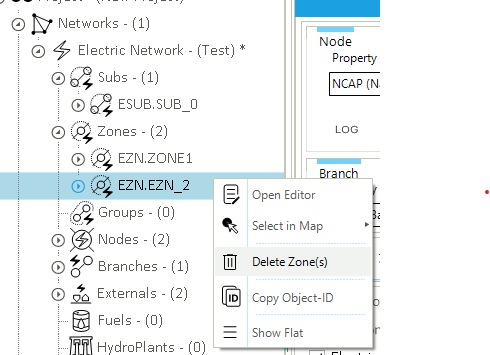
SAint will ask which remaining zones the objects in the zone you are deleting must be linked.
Your question is very useful, and I will add this short explanation to the reference documentation for clarity.
Happy SAInt modeling 