The DOT-RAW to SAInt translation plugin translates power system data from .raw files to SAInt format.
Download it here:dot-raw-to-saint-plugin-0.3.3.zip (118.2 MB)
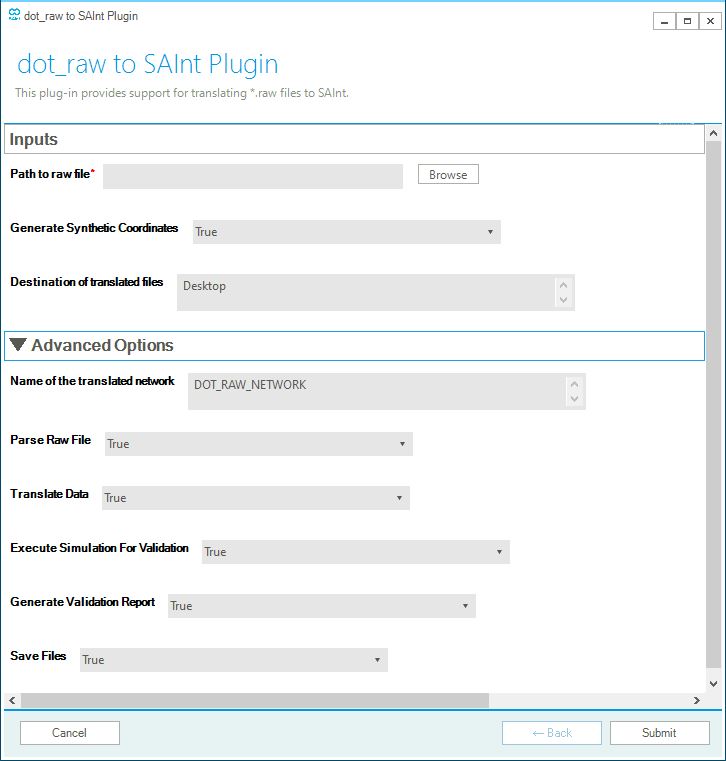
Screenshot:
Overview
The DOT-RAW to SAInt translation plugin translates power system data from .raw files to SAInt format.
-
Multi-Component Translation: Supports translation of major power system components:
- ZONE
- BUS
- GENERATOR
- LOAD
- TRANSFORMER
- BRANCH
- SWITCHING DEVICE
- FIXED AND SWITCHED SHUNT DEVICES
-
Version Compatibility: Supports DOT-RAW file versions 33, 34 and 35.
-
Validation & Reporting: Automatically generates comparison plots to validate translation accuracy.
-
Synthetic Coordinates: Optionally generates synthetic BUS coordinates for visualization in SAInt GUI.
Inputs
-
Path to RAW File
Full path to the*.rawfile. -
Generate Synthetic Coordinates
Option to generate synthetic BUS coordinates for visualization in SAInt. -
Destination of Translated Files
Full path to the directory where the translated SAInt network, scenario, and condition files will be saved.
If the network converges, validation plots will also be saved here.
Advanced Inputs (Optional)
-
Name of the translated network
Name for the translated SAInt network. Default is"DOT_RAW_NETWORK". -
Parse RAW File
Set toTrueto parse the.rawdata into readable CSV files. -
Translate Data
Set toTrueto convert parsed data into SAInt-compatible Excel import files. -
Run Simulation for Validation
Set toTrueto generate native SAInt network and scenario files and run a SteadyACPF simulation. -
Generate Validation Report
Set toTrueto generate HTML comparison plots. -
Save Output Files
Set toTrueto save all generated files.
Example with IEEE 118 Bus System
The following is an example of running the plugin with the IEEE 118 Bus System.
What You Will Need
To start, please download:
- The latest version of SAInt.
- The IEEE 118-Bus System
.rawdataset, downloadable from: here - This DOT-RAW to SAInt plugin. Unzip it and note the location of the download.
dot-raw-to-saint-plugin/
├── main.exe
├── form.yaml
└── (other files)
Running the PlugIn
- Open SAInt GUI
- Go To Tools → Plugin → Select (select the folder containing the plugin)
- Execute via Tools → Plugin → Execute
Fill out the form:
- Path to RAW File: ./path to your .raw file
- Generate Synthetic Coordinates: True
- Destination of Translated Files: ./path to your output directory
- Name of the translated network (Advanced Input): IEEE_118
Understanding the Output
In the specified output directory, the following files will be created:
- SAInt native files:
IEEE_118.enet: SAInt network fileacpf.esce: Scenario fileacpf.econ: Scenario condition file
- Logs
info.log: Records translation operations
- SAInt network Excel
network.xlsx: SAInt-compatible network import file
- Validation plots (Interactive HTML)
- Direct comparison
voltage_comparison.htmlbranch_power_flow_comparison.htmlgenerator_power_comparison.htmlload_power_comparison.htmlshunt_power_comparison.html
- Difference distribution
voltage_difference_distribution_violin.htmlbranch_power_flow_distribution_violin.htmlgenerator_power_difference_violin.htmlload_power_difference_violin.htmlshunt_power_difference_violin.html
- Direct comparison
- Parsed Data (CSV)
- A parsed/ folder containing .csv representations of .raw sections for reference.
What’s New?
- System data parsing: Properties like version, network frequency are now automatically parsed.
- Version 34 support: Files with version 34 can now be translated!
- Group Translation Logic: SAInt
EGRPobjects are now created from rawzoneobjects! - Bug Fixes: Various bug fixes like fixing translation failures for switched shunt objects.